Start with your photo
Add up to six JPG or PNG references, each up to 5 MB. Sign in and check your balance before uploading.
 ImgEdify
PHOTO PROMPTS. PERSONAL POSSIBILITIES.
Turn a photo prompt into a portrait that feels like you. Explore cinematic, street-style, couple-inspired and sports looks. Pick a template, personalize its details and add your reference photo, or start from text. Choose a model and review the credit cost before generating, previewing and downloading your image.
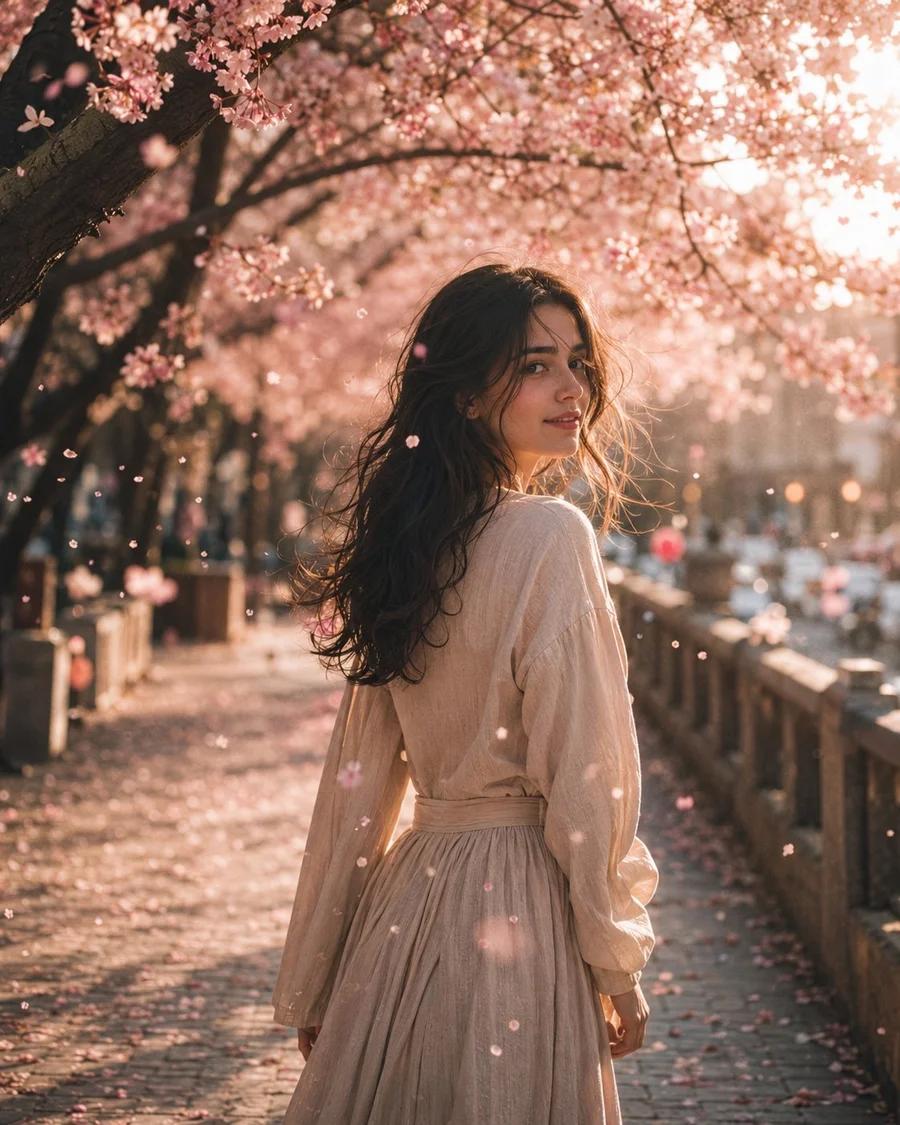
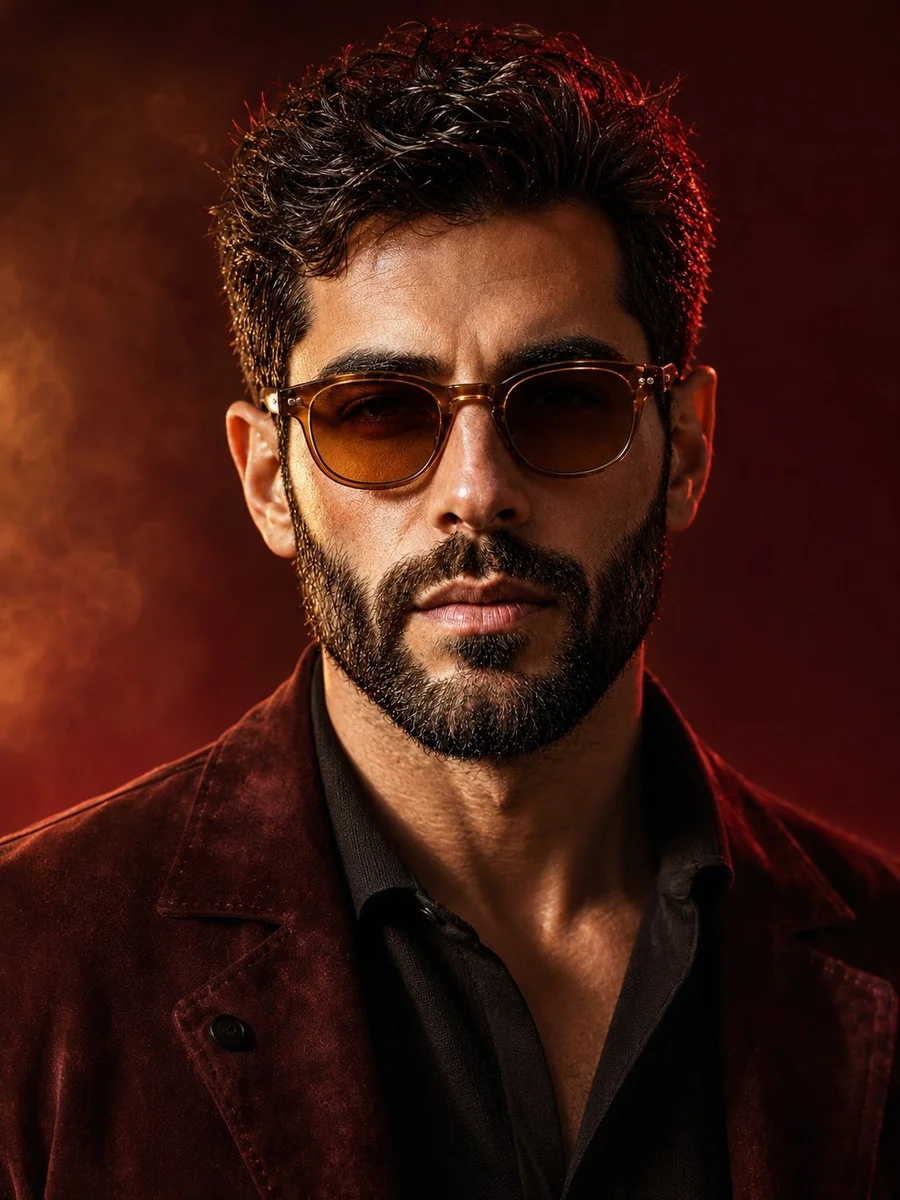
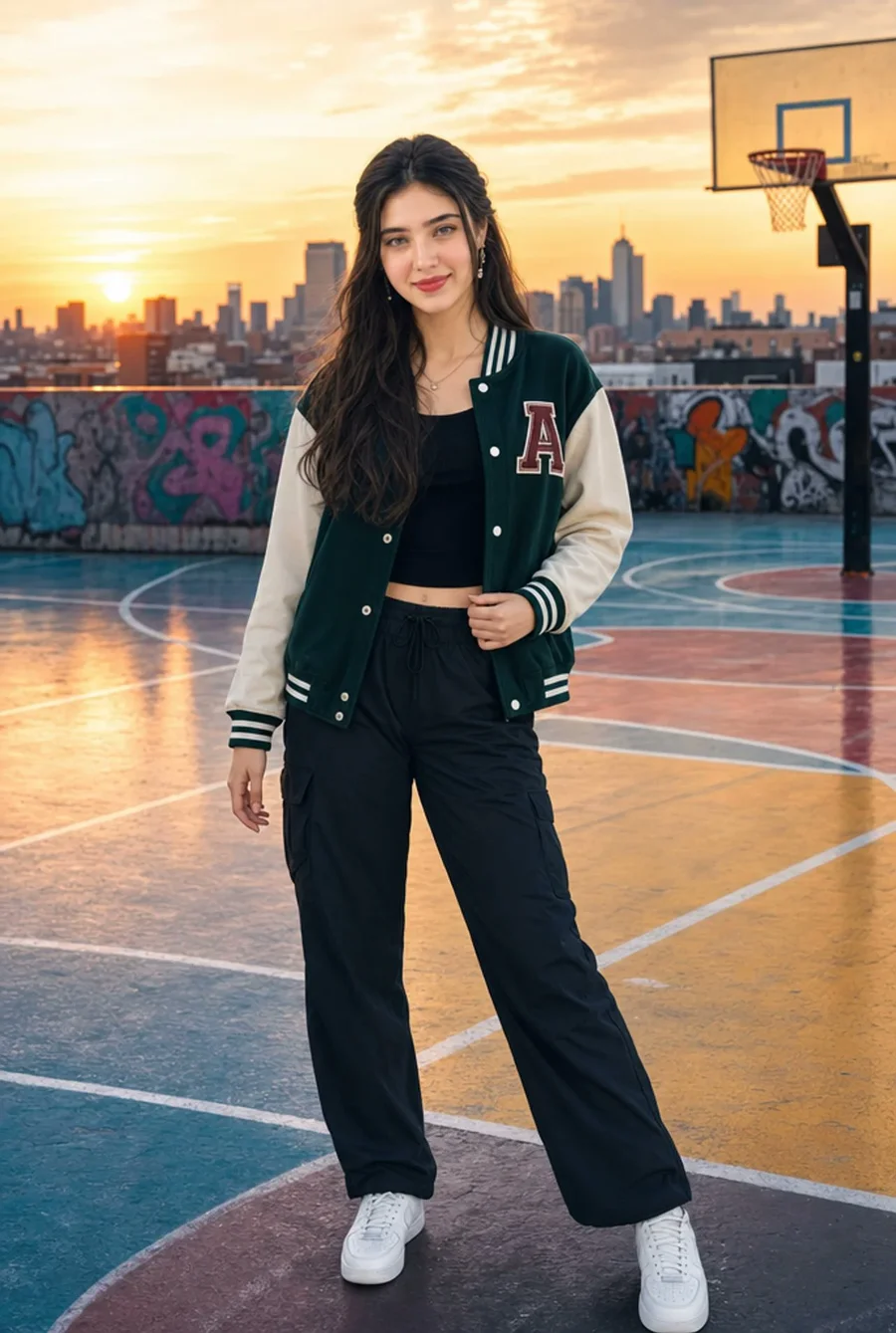
Photo template · add your own reference in Image to Image.
A portrait prompt is already loaded. Add a photo or switch to Text to Image to start from words.
Style reference by @iamsofiaijaz ↗. Generated results vary with your photo and model. Free image generations include a watermark.
THE IDEA BEHIND THE EDIT
A collection of photo directions you can actually use: a setting, a mood, a pose and the details that bring them together. Start with text, or add your photo for a personal interpretation. Results depend on the model, reference quality and instructions; exact face preservation is not guaranteed.
Add up to six JPG or PNG references, each up to 5 MB. Sign in and check your balance before uploading.
Read the instructions before you use them. Copy the complete text or load it into the editor without submitting a job.
Select an available model and supported framing. Change the outfit, lighting and scene to fit your idea.
Preview and download a completed image. Inspect faces and hands, then refine it with another editing pass.
THE PROMPT EDIT
Eight community prompt and output pairs. Preview the full image, read the original prompt and see which styles need your own reference photo.
8 prompts to explore
Browse & copy for freeStart from text
Petal-filled light · 85mm framing · Soft bokeh
{ "title": "WHISPERS OF SPRING", "scene": "A peaceful pathway beneath blooming cherry blossom trees during a warm spring afternoon. Pink blossoms fill the canopy overhead while delicate petals drift gracefully through the air. Soft sunlight filters through the branches, creating a dreamy and enchanting atmosphere.", "subject": "A young woman walks away from the camera before gently turning her head over her shoulder with a soft, mysterious smile. She wears a flowing natural linen dress that moves gracefully with the breeze, highlighting her delicate facial features and effortless elegance.", "detail": "Wind carries countless pink cherry blossom petals across the frame while warm sunlight creates glowing highlights throughout the scene. Every strand of hair moves naturally in the breeze, with ultra realistic skin texture, lifelike fabric folds, soft floral surroundings, and subtle atmospheric haze enhancing the cinematic realism.", "atmosphere": "Elegant, peaceful, romantic, dreamy, timeless, cinematic, graceful, and enchanting.", "lighting": "Warm spring sunlight filtering through cherry blossom branches, soft natural illumination, glowing highlights, volumetric light rays, gentle ambient shadows, and subtle atmospheric haze.", "composition": "Cinematic editorial portrait captured with an 85mm lens, featuring the subject in a three-quarter over-the-shoulder pose. Shallow depth of field, creamy bokeh, balanced framing with flowering trees, soft leading lines, and immersive visual storytelling.", "style": "Photorealistic, masterpiece, editorial fashion photography, analog film aesthetic, dreamy pastel color palette, ultra realistic skin texture, highly detailed, shallow depth of field, creamy bokeh, atmospheric haze, HDR, cinematic realism, 8K." }
Reference photo needed
Studio light · Tailored styling · Natural skin
A cinematic, ultra-realistic close-up portrait of a stylish man, using the provided image as an accurate face reference. Preserve his natural facial identity, thick naturally curly dark brown hair, neatly trimmed salt-and-pepper beard, strong masculine facial structure, and realistic facial proportions. He wears sophisticated round vintage amber-brown sunglasses and a premium deep burgundy suede jacket over a fitted black silk-knit shirt, creating a refined luxury fashion aesthetic. Warm cinematic studio lighting with a soft amber-golden key light illuminating the face from the front-left, complemented by a subtle crimson-red rim light outlining the hair and shoulders. The background is a rich burgundy, wine-red, and dark plum gradient, with soft atmospheric haze and subtle diffused light creating depth without distracting from the subject. Elegant warm highlights contrast beautifully against the dark clothing. Extremely detailed natural skin texture, individual beard hairs, realistic pores, subtle facial imperfections, sharp eyes visible behind slightly tinted lenses, natural reflections on the sunglasses, rich dimensional shadows, realistic fabric and suede texture, shallow depth of field. Sophisticated luxury fashion campaign, mysterious and confident mood, premium men's editorial photography, cinematic color grading, photorealistic, HDR, professional studio photography, 85mm portrait lens, f/1.8, crisp facial details, soft background bokeh, centered composition, head-and-shoulders framing, powerful masculine presence, understated elegance, 3:4 aspect ratio.
Start from text
Rooftop court · Varsity jacket · Sunset tones
Ultra-realistic, high-quality portrait of a stylish young South Asian woman standing gracefully on a colorful urban rooftop basketball court at sunset. She is standing in a relaxed and elegant posture with her weight naturally shifted to one leg, shoulders relaxed, and one hand gently resting by her side while the other lightly touches the edge of her varsity jacket. Her body is slightly angled toward the camera, creating a confident yet sophisticated appearance. She is looking directly into the camera with a warm, natural smile, projecting confidence, charm, and effortless style.
Start from textEditable template
Hand-holding POV · Backlit hair · Candid framing
Cinematic portrait photography, ultra-photorealistic, 2160x3840 vertical composition, 50mm or 85mm portrait lens rendering, shallow depth of field, clean translucent summer natural-light color grading — not overly yellow, not over-filtered. Subject: a young beautiful adult East Asian woman, [describe face shape and features, e.g. soft heart-shaped face, refined classical features, bright almond/fox eyes, petite nose bridge, naturally full lips], overall vibe sweet, sunny, energetic, cute with a touch of allure. Gaze highly engaging — bright, clear, natural catchlights, as if it speaks; corners of mouth slightly lifted, expression gentle, vivid, natural. She walks along a [scene, e.g. garden stone path / tree-lined lane / European street / courtyard], right hand reaching back to hold the hand of someone behind her; only their hand appears in the lower-left corner — like a first-person couple's POV snapshot. She glances back at the camera while her body stays in a forward walking motion, posture elegant and natural, clearly a candid captured moment with a faint in-love feeling. Long [hair color] hair, [style, e.g. naturally wavy / relaxed big waves / airy bangs / half-up], many strands tousled and flying in the wind, richly layered and dynamic. Strong natural side-backlight rims the hair edges — clean, crisp rim light and semi-translucent glow, hair edges lit as if by sunlight, light and luminous. This is the core highlight of the image. She wears [outfit, e.g. white lace slip dress / beige slip dress / light-blue short-sleeve top with white skirt / light-pink fitted dress], fabric texture natural, material light and soft. Bright natural summer sunlight realistically warms her skin, shoulders, collarbone, and clothing with soft, clean highlight transitions. Skin texture: extremely realistic — visible fine pores, natural skin texture, faint imperfections, subtle tone variation, soft sheen. Cheeks, nose tip, shoulders show natural delicate gradations in sunlight. Translucent, healthy, real and refined — no plastic look, no waxwork, no over-smoothing. Background: soft atmospheric blur, never distracting. Avoid: over-smoothing, plastic skin, CG look, anime look, wig look, stiff expression, dead eyes, stiff poses, overall yellow cast, overexposed face, distorted features, wrong fingers, deformed hands, cluttered background, heavy influencer retouching.
Start from text
Concrete texture · White denim · Flying birds
A stylish cinematic portrait of a confident young woman leaning casually against a textured urban concrete wall, surrounded by vibrant flying birds including blue macaws, white seagulls, and a colorful hummingbird. Black graffiti-style bird silhouettes painted on the wall create an artistic street-art vibe. She is wearing a trendy all-white outfit — oversized denim jacket, fitted graphic tee, skinny jeans, and black sneakers. Soft natural daylight, realistic shadows, ultra-detailed fashion photography, urban luxury aesthetic, sharp facial features, glossy hair, high-end editorial style, dynamic composition, photorealistic, depth of field, 8K quality.
Reference photo needed
Mountain setting · Cloud balloons · Fashion styling
Create a dreamy ultra-photorealistic outdoor fashion photograph based on the person in @image1. IDENTITY & FACE: Preserve the exact facial identity of the person in @image1. Keep the same face shape, facial proportions, eyes, eyebrows, nose, lips, skin tone, hairstyle, hairline, and all recognizable facial features. The person must remain clearly recognizable and consistent with the reference image. Do not redesign or replace the face. POSE & COMPOSITION: Create a full-body vertical portrait of the person standing naturally on a grassy mountain ridge. The body is slightly turned toward the camera while the face looks naturally toward the viewer. One hand gently holds several long white strings attached to an enormous fluffy white cloud floating directly above the person like a whimsical balloon bouquet. The other hand rests naturally beside the body. SCENE: A breathtaking high-altitude mountain landscape with layers of distant blue-green mountains stretching across the horizon. The subject stands on a natural grassy ridge with delicate wild grass around her feet. Vast open sky dominates the upper portion of the composition. CLOUD BALLOON: Create one enormous soft white cumulus cloud directly above the subject, visually resembling a giant floating cloud balloon. Multiple thin white strings descend from the cloud and gather elegantly into the person's hand. The strings should look physically believable and naturally connected to the cloud. The cloud is fluffy, voluminous, bright white, and beautifully illuminated by sunlight. CLOTHING: Dress the person in a completely modest, elegant, fully covered outfit: long flowing light-blue maxi dress reaching the ankles loose long sleeves covering the arms completely high and modest neckline opaque non-transparent fabric full-length flowing skirt simple white closed-toe sneakers small woven crossbody bag No exposed midriff, no deep neckline, no sheer fabric, no short skirt, no revealing clothing. The outfit should look graceful, comfortable, elegant, and wholesome. ACCESSORIES: Add tasteful round dark sunglasses and a simple woven shoulder/crossbody bag. Keep accessories minimal and natural. HAIR: Keep the person's original hairstyle and hair color from @image1 as much as possible. Allow a few natural strands of hair to move gently in the mountain breeze. LIGHTING: Bright natural midday sunlight, soft atmospheric illumination, realistic highlights on the white cloud and dress, subtle natural shadows, crisp but gentle exposure, beautiful blue-sky contrast. PHOTOGRAPHY STYLE: Ultra-photorealistic professional travel-fashion photography, realistic skin texture, natural fabric details, physically accurate lighting, realistic depth of field, cinematic atmospheric perspective, high dynamic range, sharp subject with a softly detailed background. COLOR PALETTE: Sky blue, soft white, pale powder blue, natural green grass, and distant blue mountains. Clean, airy, dreamy color grading with a peaceful summer atmosphere. COMPOSITION: 9:16 vertical portrait, full body visible from head to shoes, subject positioned slightly below center, enormous blue sky and cloud occupying the upper half, distant mountains forming a soft horizontal horizon, balanced negative space, visually striking editorial travel photograph. IMPORTANT: Preserve the exact identity from @image1. Do not change the person's recognizable face or facial structure. Keep the outfit completely modest, opaque, and fully covering. Maintain realistic anatomy, natural hands, realistic proportions, and believable interaction between the person, strings, cloud, grass, and mountain environment.
Reference photo needed
Double exposure · Aviator glasses · Layered composition
A cinematic double-exposure fashion portrait featuring a woman with the uploaded face used 100% as reference, wearing stylish metallic aviator sunglasses. The composition artfully blends a large, semi-transparent close-up profile of her face on the left with her full-body figure standing confidently on the right. She wears an open, light-grey textured corduroy shirt layered over a dark grey fitted t-shirt and dark denim jeans, posing naturally with her hands in her pockets. She has long, flowing dark hair, flawless skin, elegant feminine features, and a confident, sophisticated expression. The background is a minimalist neutral studio setting, allowing the double-exposure composition to remain the visual focus. The color grading features a sophisticated warm desaturated sepia and charcoal palette, enhanced by a soft golden-orange light-leak flare in the upper-right corner. Professional 85mm lens photography with high-contrast yet soft cinematic lighting accentuates the fabric textures, facial details, and layered portrait effect. Ultra-realistic skin texture, luxury fashion-editorial aesthetic, premium magazine-cover quality, subtle film grain, cinematic depth, elegant shadows, refined color grading, modern retro-inspired styling, masterpiece composition, ultra-sharp focus, visually striking storytelling, high-end commercial fashion campaign look.
Reference photo needed
Full-length pose · Boutique setting · Minimal styling
A full-body editorial fashion photograph of a beautiful young woman with the same appearance as the reference, long glossy dark hair, soft bangs, fair skin, and refined feminine features. She stands casually in an upscale minimalist fashion boutique, wearing an oversized pastel-blue knit sweater paired with a black pleated tennis-style skirt, white crew socks, and chunky designer sneakers. Relaxed confident pose, gentle smile, luxury retail interior with modern clothing racks, neutral-toned garments, warm ambient lighting, wood and stone textures, clean architectural lines, cinematic depth of field, realistic lighting, premium fashion advertising, Vogue-style editorial, ultra-detailed, sharp focus, photorealistic, 4K.
Gallery images are external community examples from the awesome-gpt-image-2 catalog, shared under its MIT license. They are not ImgEdify-generated results. Source reference images may be required; replace bracketed placeholders before generating.
YOUR NEXT PHOTO, IN THREE STEPS
Browse and copy every prompt for free. Generation requires an account and sufficient credits. Eligible free signup credits can count toward the cost shown in the editor.
Start with your photoStart with the loaded studio portrait or choose a style in the gallery. Reference-photo templates need your own JPG or PNG; text templates can start in Text to Image mode. Sign in to upload or generate.
For the couple-inspired template, fill in the face, setting, hair and outfit fields, then choose Apply my details. For any style, edit the full prompt directly. Choose your model and framing, then review the credit cost before clicking Create.
Preview the completed image, check small details and download it. Refine the result using the editor’s history and continue-editing controls.
SMALL CONTROLS. MORE POSSIBILITIES.
The full prompt stays editable. Adapt the subject and scene before you commit credits to a generation.
Your selected model and image quantity determine the displayed cost. Upload and generation use the existing account checks.
Generating creates a new result. Your original file stays available, and a completed image can be previewed before download.
A PHOTO FOR THE OCCASION
Try a new portrait direction for your own social profile. Keep the face easy to recognize, then use Image Resizer to fit your platform.
Build a couple-inspired keepsake with warm light and a personal setting. Use the AI Image Editor for a second pass on clothing or background details.
Test streetwear and sports scenes for a content series. Explore the Prompt Library for more compositions to adapt to your own subjects.
KEEP THE IDEA GOING
SAME YOU. NEW POSSIBILITIES.
Choose a prompt. Add your photo. Create something personal.