One subject, clearly framed
Start with one person, pet or character. An unobstructed full-body photo gives the model more information about clothing, limbs and proportions.
A photo with a little rhythm
Turn one photo into a Toc Toc-inspired dance video with a raised knee, playful hops and a knocking gesture. Add a dance reference video to guide the movement, scene and camera, or choose a style for a prompt-led interpretation. Check the credit cost and generate here. Preview the whole clip before downloading; motion and identity can still vary.
Classic solo uses a character photo and a dance video reference. Other styles are prompt-only demonstrations. Your result will vary.
The dance, in a photo
A photo supplies the character. An optional dance video guides the hops, knocking gestures, turns and scene; without a reference clip, a prepared prompt supplies the routine. It creates a new interpretation, so expect variation in the face, footwork and timing rather than an exact copy of a viral performance.
Start with one person, pet or character. An unobstructed full-body photo gives the model more information about clothing, limbs and proportions.
Pick a classic room, street-style studio, upright pet character or original mascot. Each choice uses a prepared scene direction.
Keep the default ten-second vertical clip or change the settings. Watch the generated result and check the movement before downloading.
Actual generated clips
These examples were generated with Seedance 2.0 at 480p and 9:16. Classic solo is a 10-second result using the AI-created character photo shown below plus a dance video reference. The other three are 6-second prompt-only scene demonstrations. Audio has been removed from the examples. They show possible interpretations, not a guarantee of your result.
A new character follows the reference dance and room with one short replacement instruction.
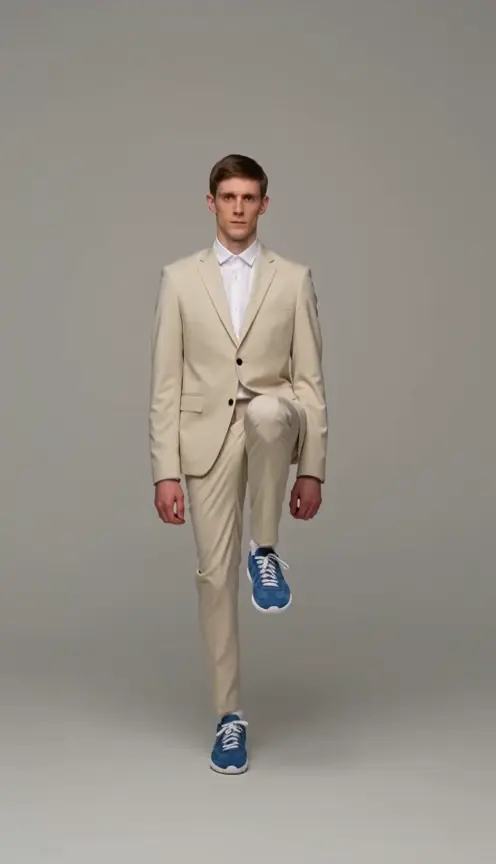
Raised knee · Forward knocking fist · Full-body framing
Settings: 10s · Photo + video reference · 480p · 9:16
Replace the dancer in Video 1 with the character in Image 1.
A casual outfit and an uncluttered studio for a personal social clip.
Visible shoes · Independent arm motion · Consistent outfit
Settings: 6s · Prompt only · 480p · 9:16
A six-second full-body dance video of one fictional adult woman with short curly hair, a mustard sweatshirt, loose dark jeans and white sneakers. A pale blue studio with a clean floor. Keep the uploaded subject’s original outfit and colors; use relaxed, playful body language. Perform this playful hop-and-knock sequence with a deadpan expression: first raise one knee and bounce twice on the other foot; then keep bouncing and mime knocking on an invisible door with one fist three times; finally place both feet down, give one small forward kick, then spread both arms low and hold a still finishing pose. Fit the sequence into 6 seconds. The knee lifts, one-foot hops and knocking gesture must be clearly visible. Fixed frontal camera, head and both feet always visible, continuous full-body shot, grounded feet, consistent appearance, exactly two arms and two legs. No camera movement, cuts, additional subjects, text, logos or singing.
This upright cat simplifies the hops into small steps and paw gestures: a playful variation, not a precise dance copy.
Recognizable markings · Upright fantasy pose · Paw knocking gesture
Settings: 6s · Prompt only · 480p · 9:16
A six-second full-body dance video of one stylized anthropomorphic orange tabby cat with white paws, standing upright on two hind legs. A pale peach studio. Reimagine the single pet as a stylized upright dancing character, retaining its face, fur markings and ears. Use two hind legs for the hops and a front paw for the knock; this is fantasy character motion, not natural animal behavior. Perform this playful hop-and-knock sequence with a deadpan expression: first raise one knee and bounce twice on the other foot; then keep bouncing and mime knocking on an invisible door with one fist three times; finally place both feet down, give one small forward kick, then spread both arms low and hold a still finishing pose. Fit the sequence into 6 seconds. The knee lifts, one-foot hops and knocking gesture must be clearly visible. Fixed frontal camera, head and both feet always visible, continuous full-body shot, grounded feet, consistent appearance, exactly two arms and two legs. No camera movement, cuts, additional subjects, text, logos or singing.
Explore an original mascot’s movement while keeping its silhouette readable.
Simple silhouette · Separate limbs · Character motion
Settings: 6s · Prompt only · 480p · 9:16
A six-second full-body dance video of one original friendly teal robot with a rounded square head, two articulated arms and two short legs, no logos. A pale mint studio. Preserve the original character’s distinctive silhouette, face, colors and limb design. Use clear, simple movements. Perform this playful hop-and-knock sequence with a deadpan expression: first raise one knee and bounce twice on the other foot; then keep bouncing and mime knocking on an invisible door with one fist three times; finally place both feet down, give one small forward kick, then spread both arms low and hold a still finishing pose. Fit the sequence into 6 seconds. The knee lifts, one-foot hops and knocking gesture must be clearly visible. Fixed frontal camera, head and both feet always visible, continuous full-body shot, grounded feet, consistent appearance, exactly two arms and two legs. No camera movement, cuts, additional subjects, text, logos or singing.
From still to steps
Explore the styles and preview your selected photo for free. Generation requires sign-in and sufficient credits; available free credits count toward the displayed cost and may not cover a full video.
01
Choose JPG, PNG or WebP, up to 10 MB. Keep one subject fully visible, with room around the hands and feet. The selected image stays local until you generate.
02
Add a dance reference for closer choreography and its original scene, or select a photo-only style. Use MP4 or MOV, 2–15 seconds, 480p–720p, up to 100 MB. Ten seconds gives the routine room to develop. Review the input-plus-output credit cost and sign in to generate.
03
Check the face, knocking hand and footwork in the on-page preview. Download the video, then add permitted music in your editor or publishing app. Exact beat matching is not guaranteed.
Before the first hop
Select a dance style instead of writing a long prompt. Trying an example changes the style in the creator while keeping your selected photo.
The current credit quote updates with duration and resolution. A dance reference adds its duration to the billable time. The server verifies the final quote. Reference jobs are saved as Canvas projects.
Choose vertical 9:16 for a social clip or landscape 16:9 for a wider scene. Available lengths run from 4 to 15 seconds; very short clips can omit steps.
The generated video stays available to preview and download. Inspect the whole performance for extra limbs, face changes or awkward steps before sharing.
Give your own portrait a playful performance for a Reel, Short or message to friends. Prepare a cleaner starting image with the AI Image Editor.
Try a deliberately stylized upright routine using your pet’s markings. Explore other movements with Image to Video when you want a quieter, more natural scene.
Test a character’s personality in a short full-body performance. For a second scene with two characters, continue with Hotel Lobby AI.
Keep creating
Choose one subject. Give the hop-and-knock routine your own spin.
Make my Toc Toc dance